Oversight and practice
Consulting practice management
SafeGora supports your consulting practice: client portfolio, visits and deliverables, with access each client grants.
Practice software for private safety consultants
Plan visits. Deliver reports. Follow up.
SafeGora supports independent consultants and teams working in client-authorized workspaces. Employer-approved scope, an eligible named consultant seat and verified client entry come before protected work.
See the consultant buying guide and application expectations →Read the complete consultant example →How it works
From your portfolio to the client’s next step.
One monthly engagement in the real interface with synthetic data. Employer-approved scope, an eligible named consultant seat and verified client entry come before protected work. Report acknowledgment, proposed-action acceptance and completion are separate decisions.

01 · Portfolio
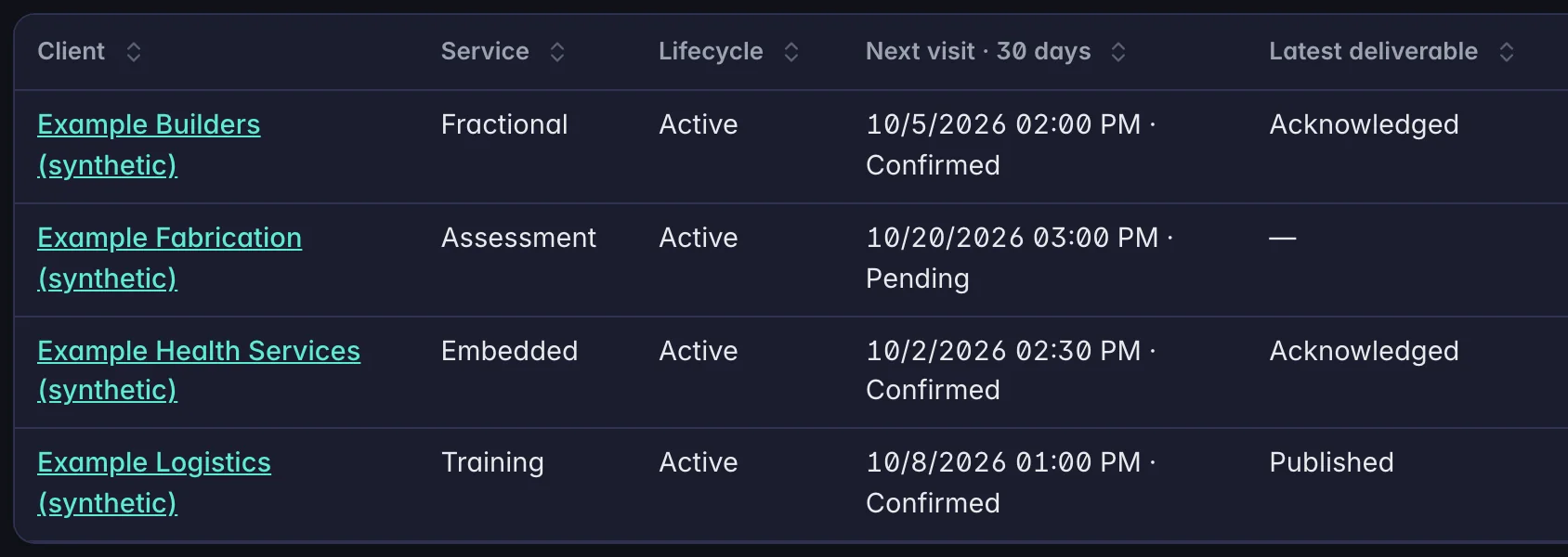
Every client engagement in one register
SafeGora supports your consulting practice: client portfolio, visits and deliverables, with access each client grants.
- Marker A: The client, linked to that engagement's workspace.
- Marker B: The next visit in the coming 30 days, and whether the client has confirmed it.
- Marker C: The latest report and where it stands: published or acknowledged.

02 · Visits
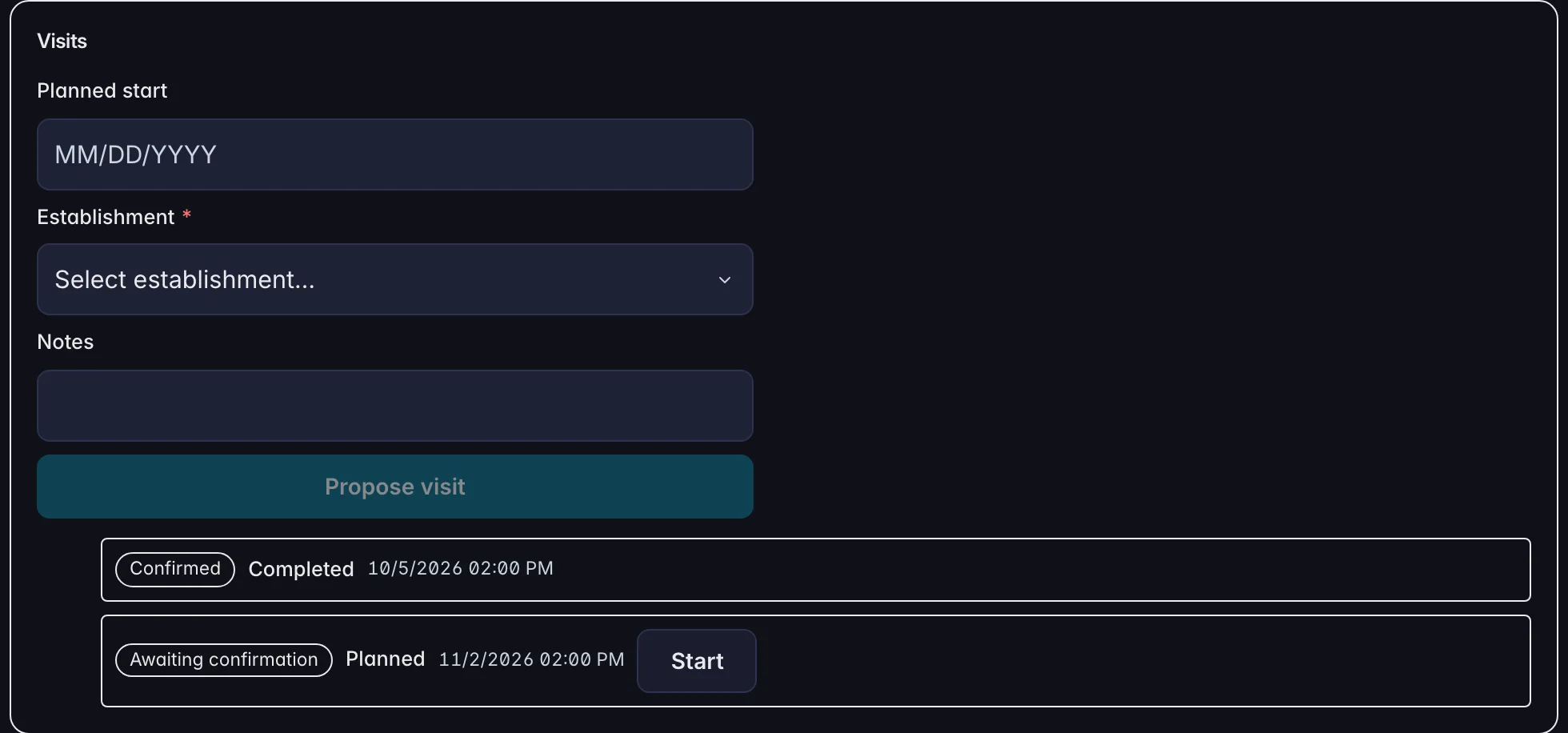
The consultant proposes each visit
A consultant proposes a visit with a date, the site and a note. Each visit shows whether the client has confirmed it.
- Marker A: Propose a visit: the date, the site and a note.
- Marker B: October's visit: confirmed by the client, and completed.
- Marker C: November's visit: waiting for the client to confirm it.

03 · The client
The report arrives in the client's own workspace
The client sees the visit report and the next visit in its own workspace, and acknowledges the report and confirms the visit there.
- Marker A: Acknowledge the visit report. The consultant's register then shows it as acknowledged.
- Marker B: Confirm the proposed visit date.

04 · Follow-through
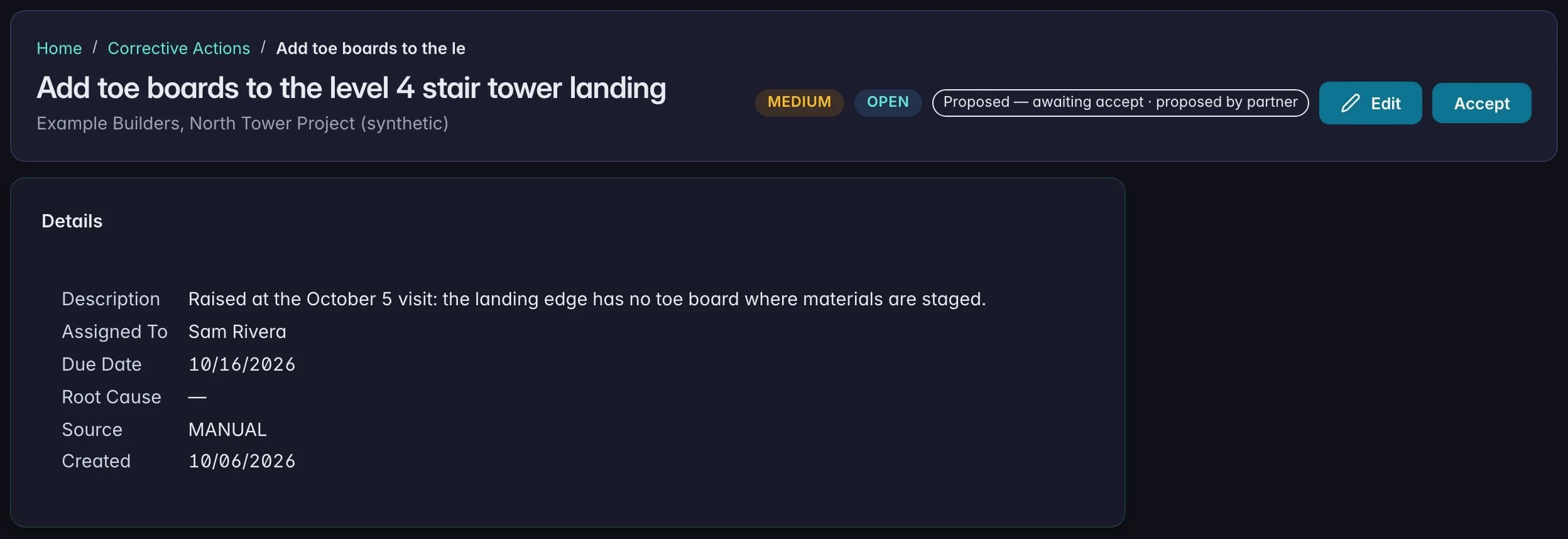
The client decides what becomes work
A corrective action the consultant proposes from the visit arrives in the client's register with an owner and a due date, marked as proposed until the client accepts it.
- Marker A: Proposed by the consultant, waiting for the client.
- Marker B: Accept: the client's decision, in its own workspace. Acceptance does not complete the action.
- Marker C: An owner and a due date on the client's side.
Read all steps
Every client engagement in one register
SafeGora supports your consulting practice: client portfolio, visits and deliverables, with access each client grants.
The client, linked to that engagement's workspace.
The next visit in the coming 30 days, and whether the client has confirmed it.
The latest report and where it stands: published or acknowledged.
The consultant proposes each visit
A consultant proposes a visit with a date, the site and a note. Each visit shows whether the client has confirmed it.
Propose a visit: the date, the site and a note.
October's visit: confirmed by the client, and completed.
November's visit: waiting for the client to confirm it.
The report arrives in the client's own workspace
The client sees the visit report and the next visit in its own workspace, and acknowledges the report and confirms the visit there.
Acknowledge the visit report. The consultant's register then shows it as acknowledged.
Confirm the proposed visit date.
The client decides what becomes work
A corrective action the consultant proposes from the visit arrives in the client's register with an owner and a due date, marked as proposed until the client accepts it.
Proposed by the consultant, waiting for the client.
Accept: the client's decision, in its own workspace. Acceptance does not complete the action.
An owner and a due date on the client's side.
Illustrative: the real SafeGora interface with synthetic data.
Client-controlled access
Every client. An explicit permission.
The practice workspace organizes your consulting work. Each employer controls access to its own records. Being a practice administrator does not replace a named consultant seat.
Request the right scope
Match the existing employer and request the access your work needs. The employer reviews the named practice and requested scope.
Wait for the employer decision
Pending and declined requests give no access to protected client records. Expired or revoked relationships do not permit protected work.
Assign a seat, then enter
An eligible named consultant explicitly enters the client workspace. Work begins only after the correct client session is verified, within the approved scope.
Connecting a client
Two starting points. One permission boundary.
Already using SafeGora
Use the supported matching process to request access to the employer’s existing workspace. The employer approves or declines the scope before you enter.
New to SafeGora
The employer needs its own setup and subscription path. Follow the client setup options available in your practice workspace, or send the employer through employer onboarding, then request access.
See employer setup →No client ready yet? Read the public example while you arrange access. Client approval does not pause the trial or create a connected client.
What it does
What you can do
Your consulting practice
SafeGora supports your consulting practice: client portfolio, visits and deliverables, with access each client grants.
$79 per named consultant per month plus tax; approved practices get a 30-day trial for up to 10 consultants.
Your practice workspace is billed separately from your clients' employer subscriptions.
Good to know
- Practices apply and are approved before the workspace is ready.
- Client employers keep their own subscriptions.
- Each client grants access to its own records.
Practice subscription
A named consultant, counted once across clients.
For independent consultants and teams
Consulting practice subscription
$79 / named consultant / month
No base fee. Each person is counted once across clients. Client employer subscriptions are separate. USD plus applicable tax.
We aim to provide an initial response within two business days. Approval may require additional information. Your trial starts when your application is approved and your workspace is ready. 30 days for up to 10 consultants, no card required and no automatic charge. Eligible practices can choose a paid subscription in Billing after reviewing and accepting a separate paid Order. Trials do not convert automatically. Existing subscriptions keep their accepted terms.
Start your 30-day trialSee consultant pricing and terms →Waiting for client approval uses trial time. An expired, unpaid practice has no consulting capacity.
Works with
Modules that share the same records
- Inspections and safety auditsRun inspections and safety audits from templates on a phone or computer, and turn findings into assigned actions.
- Corrective actionsAssign corrective actions with an owner and due date, attach completion evidence, and record who checked the fix.
- Incidents and OSHA recordsCapture incidents and near misses from the field or the office and keep one case record from first report to closure.
Try it with your own records.
Employers start with 30 days of Pro and no card. Safety consultants apply first; their trial starts after approval and workspace setup.