Product tour
See how the work connects.
Two workflows in the real interface with synthetic data: a Site Scan finding from the photo to the tracked action it raises, and a consulting engagement from the consultant's register to the client's workspace.
Production AI generation is currently held. A trial, a price, or a description does not turn it on. Supported non-AI evaluation and fictional examples remain available only where a page provides them. Manual recordkeeping and other non-AI work are not disabled. Do not send workplace records expecting an AI answer.
How it works
From the field to the record, with a person deciding at every step.
One Site Scan finding, start to finish, in the real interface with synthetic data. The software suggests; a supervisor decides; the decision becomes tracked work with its evidence.
Production AI generation is currently held. A trial, a price, or a description does not turn it on. Supported non-AI evaluation and fictional examples remain available only where a page provides them. Manual recordkeeping and other non-AI work are not disabled. Do not send workplace records expecting an AI answer.

01 · Input
A photo from the site walk
A supervisor photographs the work area during a walk. Up to 10 photos per scan; supported screens keep working without a connection and sync when you reconnect.
- Marker A: The open front edge of the platform: no top rail, mid rail or toeboard.

02 · Suggestion
A suggested finding, with its standard
SafeGora suggests a finding with the standard it relates to. It stays pending until a person reviews it.
- Marker A: Severity, category and status. Pending means no one has decided yet.
- Marker B: The citation is checked before it is saved; an unverified citation is flagged, not hidden.
- Marker C: Confirm or dismiss: the supervisor's call.

03 · Decision
The supervisor decides
The supervisor confirms the finding on site, and the recommended action is selected to become tracked work.
- Marker A: Confirmed by the supervisor.
- Marker B: AI suggestions are advisory only; nothing is created without a person.
- Marker C: The recommended action, selected to become tracked work.

04 · Record
Finding reviewed. Action still open.
The finding has been processed and linked to a corrective action. The action remains Open: an owner must do the work and provide the required completion evidence and review.
- Marker A: RESOLVED describes the processed finding, not a repaired physical condition. The linked action remains Open.
- Marker B: The scan photo is linked to the action as evidence.
Read all steps
A photo from the site walk
A supervisor photographs the work area during a walk. Up to 10 photos per scan; supported screens keep working without a connection and sync when you reconnect.
The open front edge of the platform: no top rail, mid rail or toeboard.
A suggested finding, with its standard
SafeGora suggests a finding with the standard it relates to. It stays pending until a person reviews it.
Severity, category and status. Pending means no one has decided yet.
The citation is checked before it is saved; an unverified citation is flagged, not hidden.
Confirm or dismiss: the supervisor's call.
The supervisor decides
The supervisor confirms the finding on site, and the recommended action is selected to become tracked work.
Confirmed by the supervisor.
AI suggestions are advisory only; nothing is created without a person.
The recommended action, selected to become tracked work.
Finding reviewed. Action still open.
The finding has been processed and linked to a corrective action. The action remains Open: an owner must do the work and provide the required completion evidence and review.
RESOLVED describes the processed finding, not a repaired physical condition. The linked action remains Open.
The scan photo is linked to the action as evidence.
Illustrative: AI-generated photograph and the real SafeGora interface with synthetic data.
How it works
From your portfolio to the client’s next step.
One monthly engagement in the real interface with synthetic data. Employer-approved scope, an eligible named consultant seat and verified client entry come before protected work. Report acknowledgment, proposed-action acceptance and completion are separate decisions.

01 · Portfolio
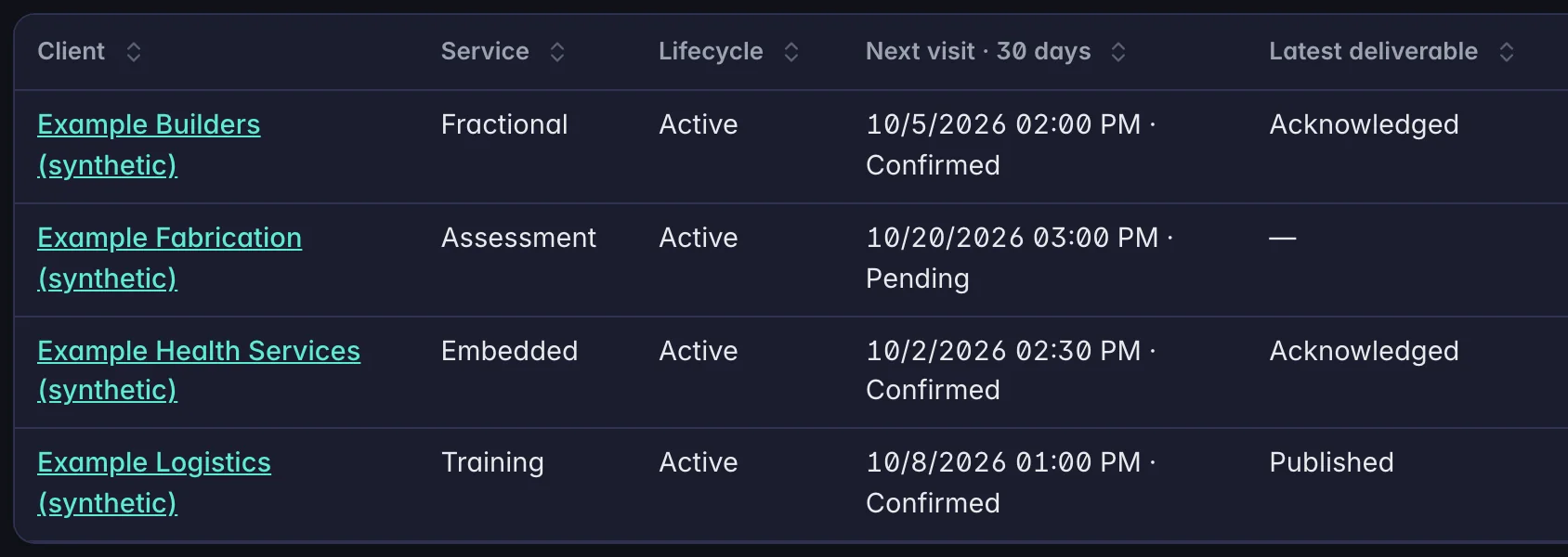
Every client engagement in one register
SafeGora supports your consulting practice: client portfolio, visits and deliverables, with access each client grants.
- Marker A: The client, linked to that engagement's workspace.
- Marker B: The next visit in the coming 30 days, and whether the client has confirmed it.
- Marker C: The latest report and where it stands: published or acknowledged.

02 · Visits
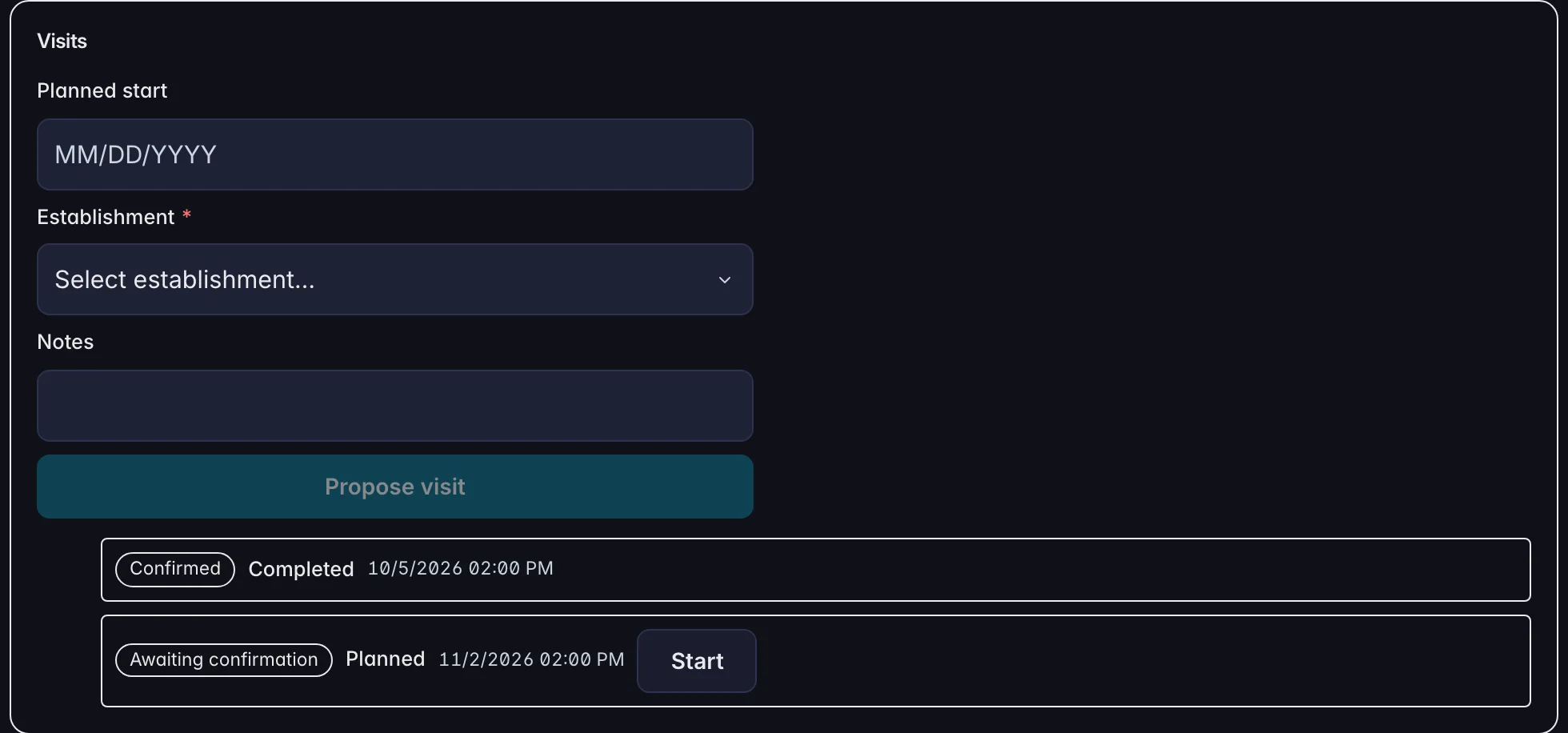
The consultant proposes each visit
A consultant proposes a visit with a date, the site and a note. Each visit shows whether the client has confirmed it.
- Marker A: Propose a visit: the date, the site and a note.
- Marker B: October's visit: confirmed by the client, and completed.
- Marker C: November's visit: waiting for the client to confirm it.

03 · The client
The report arrives in the client's own workspace
The client sees the visit report and the next visit in its own workspace, and acknowledges the report and confirms the visit there.
- Marker A: Acknowledge the visit report. The consultant's register then shows it as acknowledged.
- Marker B: Confirm the proposed visit date.

04 · Follow-through
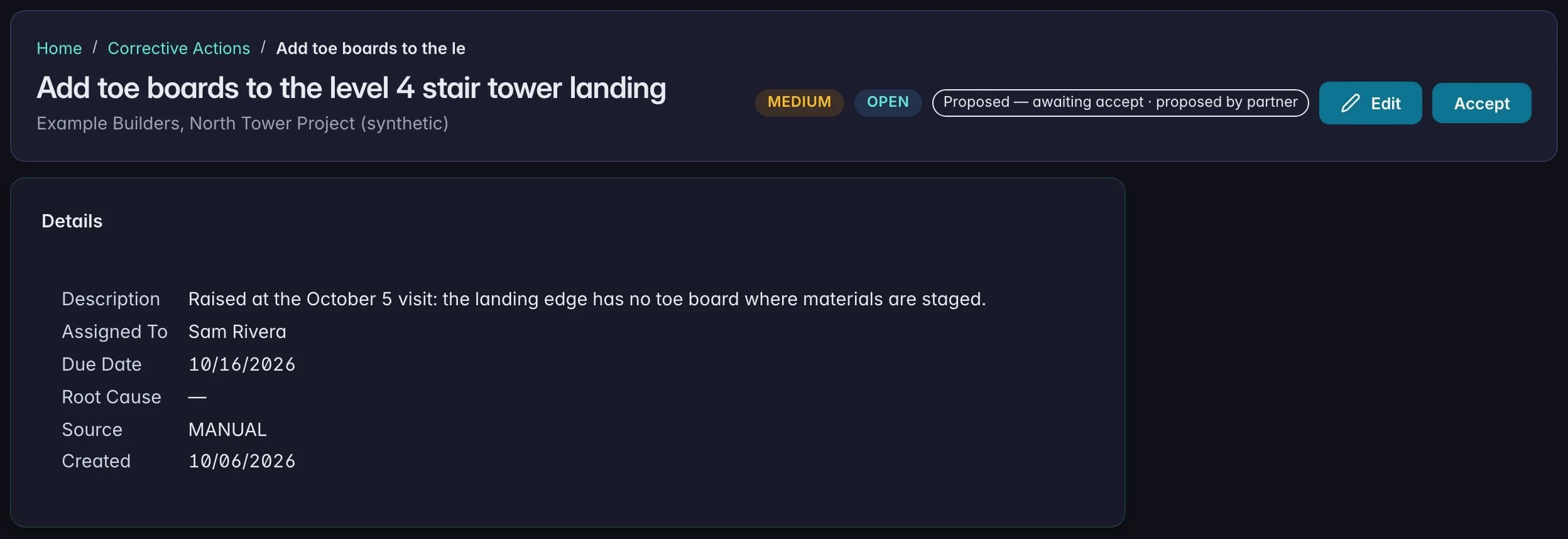
The client decides what becomes work
A corrective action the consultant proposes from the visit arrives in the client's register with an owner and a due date, marked as proposed until the client accepts it.
- Marker A: Proposed by the consultant, waiting for the client.
- Marker B: Accept: the client's decision, in its own workspace. Acceptance does not complete the action.
- Marker C: An owner and a due date on the client's side.
Read all steps
Every client engagement in one register
SafeGora supports your consulting practice: client portfolio, visits and deliverables, with access each client grants.
The client, linked to that engagement's workspace.
The next visit in the coming 30 days, and whether the client has confirmed it.
The latest report and where it stands: published or acknowledged.
The consultant proposes each visit
A consultant proposes a visit with a date, the site and a note. Each visit shows whether the client has confirmed it.
Propose a visit: the date, the site and a note.
October's visit: confirmed by the client, and completed.
November's visit: waiting for the client to confirm it.
The report arrives in the client's own workspace
The client sees the visit report and the next visit in its own workspace, and acknowledges the report and confirms the visit there.
Acknowledge the visit report. The consultant's register then shows it as acknowledged.
Confirm the proposed visit date.
The client decides what becomes work
A corrective action the consultant proposes from the visit arrives in the client's register with an owner and a due date, marked as proposed until the client accepts it.
Proposed by the consultant, waiting for the client.
Accept: the client's decision, in its own workspace. Acceptance does not complete the action.
An owner and a due date on the client's side.
Illustrative: the real SafeGora interface with synthetic data.