
Safety software for employers, consultants and risk-control teams
Safety work. A clear next step.
See what needs attention, review the evidence and keep the next action in view.
For employers, safety consultants, insurance risk-control teams and public consultation programs.
Explore a product example →Production AI generation is currently held. A trial, a price, or a description does not turn it on. Supported non-AI evaluation and fictional examples remain available only where a page provides them. Manual recordkeeping and other non-AI work are not disabled. Do not send workplace records expecting an AI answer.
Illustrative: AI-generated film.
Inspection follow-up · Product example
Keep the finding and the action connected.
Reviewing a finding does not complete the corrective action. Keep the action’s owner, Open state and next step in view.
Production AI generation is currently held. A trial, a price, or a description does not turn it on. Supported non-AI evaluation and fictional examples remain available only where a page provides them. Manual recordkeeping and other non-AI work are not disabled. Do not send workplace records expecting an AI answer.

From a field observation to an owned action. From the field to the record. From your portfolio to the client’s next step. SafeGora keeps the work connected, with a person deciding at every step.
The platform
Connect the work across your safety program.
From field observations to client follow-through. Explore 20 modules built around the work your team does.
- Site ScanPhotograph a work area. SafeGora suggests possible hazards with the standards they relate to; a supervisor accepts or rejects each one, and accepted findings become corrective actions.
Production AI generation is currently held. A trial, a price, or a description does not turn it on. Supported non-AI evaluation and fictional examples remain available only where a page provides them. Manual recordkeeping and other non-AI work are not disabled. Do not send workplace records expecting an AI answer.
- Incidents and OSHA recordsCapture incidents and near misses from the field or the office and keep one case record from first report to closure. Prepare OSHA Forms 300, 300A and 301 from your case records for a person to review, certify and post.
- Inspections and safety auditsRun inspections and safety audits from templates on a phone or computer, and turn findings into assigned actions.
- Compliance calendarSee recordkeeping and program deadlines on one calendar with reminders.
- Consulting practice managementSafeGora supports your consulting practice: client portfolio, visits and deliverables, with access each client grants.
01 / For employers
From a field observation to an owned action.
Review the suggested finding. Confirm what needs attention. Assign the next step and keep its status visible. AI assists; your people decide.
The action stays open until the work and required review are complete. Incident recordkeeping is a separate workflow.
See the employer workflow →Coordinating contractors and jobsites →Production AI generation is currently held. A trial, a price, or a description does not turn it on. Supported non-AI evaluation and fictional examples remain available only where a page provides them. Manual recordkeeping and other non-AI work are not disabled. Do not send workplace records expecting an AI answer.

01 · Input
A photo from the site walk
A supervisor photographs the work area during a walk. Up to 10 photos per scan; supported screens keep working without a connection and sync when you reconnect.
- Marker A: The open front edge of the platform: no top rail, mid rail or toeboard.

02 · Suggestion
A suggested finding, with its standard
SafeGora suggests a finding with the standard it relates to. It stays pending until a person reviews it.
- Marker A: Severity, category and status. Pending means no one has decided yet.
- Marker B: The citation is checked before it is saved; an unverified citation is flagged, not hidden.
- Marker C: Confirm or dismiss: the supervisor's call.

03 · Decision
The supervisor decides
The supervisor confirms the finding on site, and the recommended action is selected to become tracked work.
- Marker A: Confirmed by the supervisor.
- Marker B: AI suggestions are advisory only; nothing is created without a person.
- Marker C: The recommended action, selected to become tracked work.

04 · Record
Finding reviewed. Action still open.
The finding has been processed and linked to a corrective action. The action remains Open: an owner must do the work and provide the required completion evidence and review.
- Marker A: RESOLVED describes the processed finding, not a repaired physical condition. The linked action remains Open.
- Marker B: The scan photo is linked to the action as evidence.
Read all steps
A photo from the site walk
A supervisor photographs the work area during a walk. Up to 10 photos per scan; supported screens keep working without a connection and sync when you reconnect.
The open front edge of the platform: no top rail, mid rail or toeboard.
A suggested finding, with its standard
SafeGora suggests a finding with the standard it relates to. It stays pending until a person reviews it.
Severity, category and status. Pending means no one has decided yet.
The citation is checked before it is saved; an unverified citation is flagged, not hidden.
Confirm or dismiss: the supervisor's call.
The supervisor decides
The supervisor confirms the finding on site, and the recommended action is selected to become tracked work.
Confirmed by the supervisor.
AI suggestions are advisory only; nothing is created without a person.
The recommended action, selected to become tracked work.
Finding reviewed. Action still open.
The finding has been processed and linked to a corrective action. The action remains Open: an owner must do the work and provide the required completion evidence and review.
RESOLVED describes the processed finding, not a repaired physical condition. The linked action remains Open.
The scan photo is linked to the action as evidence.
Illustrative: AI-generated photograph and the real SafeGora interface with synthetic data.
02 / For private safety consultants
Client delivery starts with a clear view.
SafeGora helps independent consultants and teams plan visits, deliver reports and follow up in client-authorized workspaces.
The employer approves access. An eligible named consultant enters the correct client workspace. A pending request gives no access to protected client records.
Explore software for safety consultants →
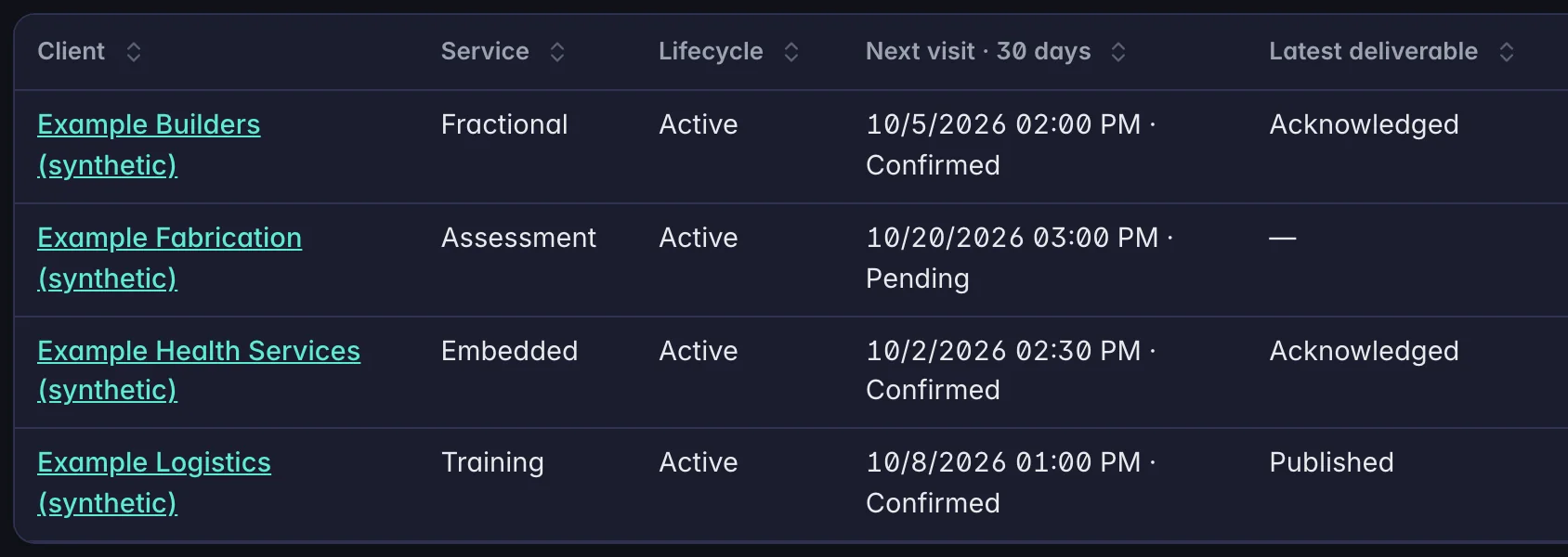
01 · Portfolio
Every client engagement in one register
SafeGora supports your consulting practice: client portfolio, visits and deliverables, with access each client grants.
- Marker A: The client, linked to that engagement's workspace.
- Marker B: The next visit in the coming 30 days, and whether the client has confirmed it.
- Marker C: The latest report and where it stands: published or acknowledged.

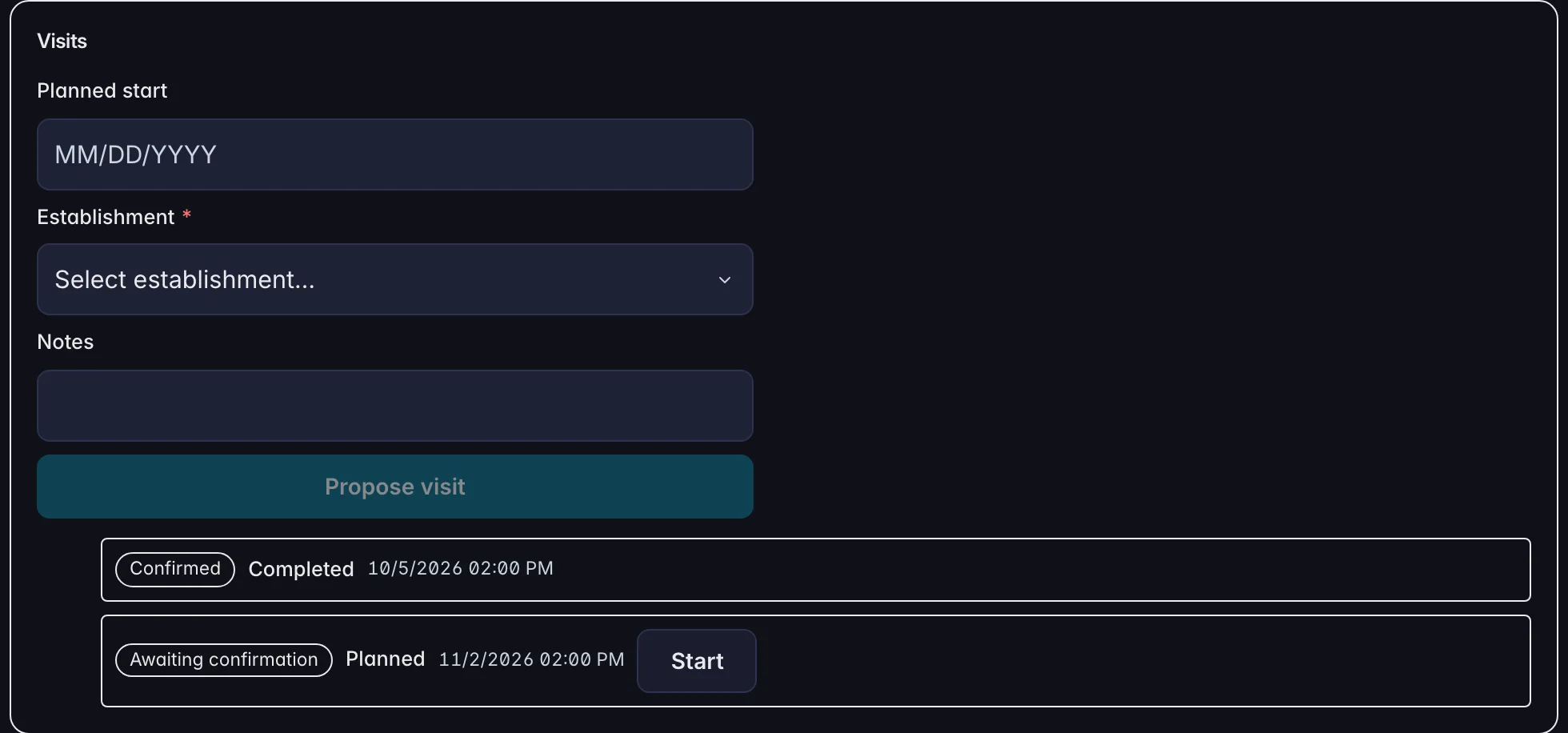
02 · Visits
The consultant proposes each visit
A consultant proposes a visit with a date, the site and a note. Each visit shows whether the client has confirmed it.
- Marker A: Propose a visit: the date, the site and a note.
- Marker B: October's visit: confirmed by the client, and completed.
- Marker C: November's visit: waiting for the client to confirm it.

03 · The client
The report arrives in the client's own workspace
The client sees the visit report and the next visit in its own workspace, and acknowledges the report and confirms the visit there.
- Marker A: Acknowledge the visit report. The consultant's register then shows it as acknowledged.
- Marker B: Confirm the proposed visit date.

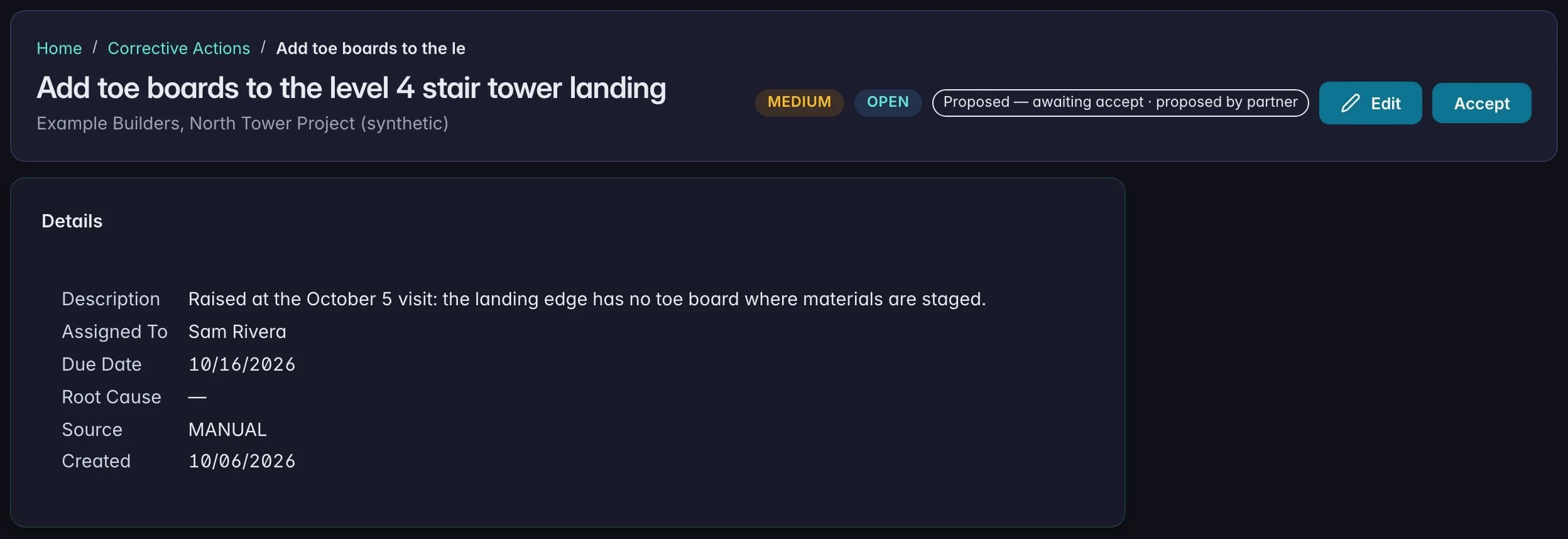
04 · Follow-through
The client decides what becomes work
A corrective action the consultant proposes from the visit arrives in the client's register with an owner and a due date, marked as proposed until the client accepts it.
- Marker A: Proposed by the consultant, waiting for the client.
- Marker B: Accept: the client's decision, in its own workspace. Acceptance does not complete the action.
- Marker C: An owner and a due date on the client's side.
Read all steps
Every client engagement in one register
SafeGora supports your consulting practice: client portfolio, visits and deliverables, with access each client grants.
The client, linked to that engagement's workspace.
The next visit in the coming 30 days, and whether the client has confirmed it.
The latest report and where it stands: published or acknowledged.
The consultant proposes each visit
A consultant proposes a visit with a date, the site and a note. Each visit shows whether the client has confirmed it.
Propose a visit: the date, the site and a note.
October's visit: confirmed by the client, and completed.
November's visit: waiting for the client to confirm it.
The report arrives in the client's own workspace
The client sees the visit report and the next visit in its own workspace, and acknowledges the report and confirms the visit there.
Acknowledge the visit report. The consultant's register then shows it as acknowledged.
Confirm the proposed visit date.
The client decides what becomes work
A corrective action the consultant proposes from the visit arrives in the client's register with an owner and a due date, marked as proposed until the client accepts it.
Proposed by the consultant, waiting for the client.
Accept: the client's decision, in its own workspace. Acceptance does not complete the action.
An owner and a due date on the client's side.
Illustrative: the real SafeGora interface with synthetic data.
Human review. Approved access.
Clear responsibility at every step.
People review AI suggestions. Employers control access to their records. Prepared records still need the applicable review, certification and submission.
Review controls and supporting evidence →How AI assistance is reviewed →- RecordkeepingForm 300A season: know the dates, then prepare the summary. Post Form 300A from February 1 to April 30 if required. Some establishments must submit electronically by March 2. SafeGora prepares; employers file and post.
- CoverageCheck OSHA jurisdiction and SafeGora support by state. State-plan depth varies; each state page shows what is ready today.
- AI assistanceAI that cites its sources, and shows where a person decides. Each AI feature answers for a stated jurisdiction and carries a confidence tier. Drafts, Site Scan suggestions and determinative outputs wait for a person. Two parts of the product act before a person reviews them, and this page names both.
- EvaluateChoose safety software by following the work. A useful evaluation goes beyond a feature checklist. Ask to see the record, the person responsible for it, and what happens when the normal workflow breaks.
- See it workSee how the work connects. Explore Site Scan findings and consultant engagements in the real SafeGora interface with synthetic data. Follow each workflow step by step, no signup needed.
Clear answers before you start.
Plans, client access and what happens after your trial.
Explore state coverage →Start your 30-day trial.
Employers start with 30 days of Pro and no card. Safety consultants apply first; their trial starts after approval and workspace setup.
Production AI generation is currently held. A trial, a price, or a description does not turn it on. Supported non-AI evaluation and fictional examples remain available only where a page provides them. Manual recordkeeping and other non-AI work are not disabled. Do not send workplace records expecting an AI answer.